
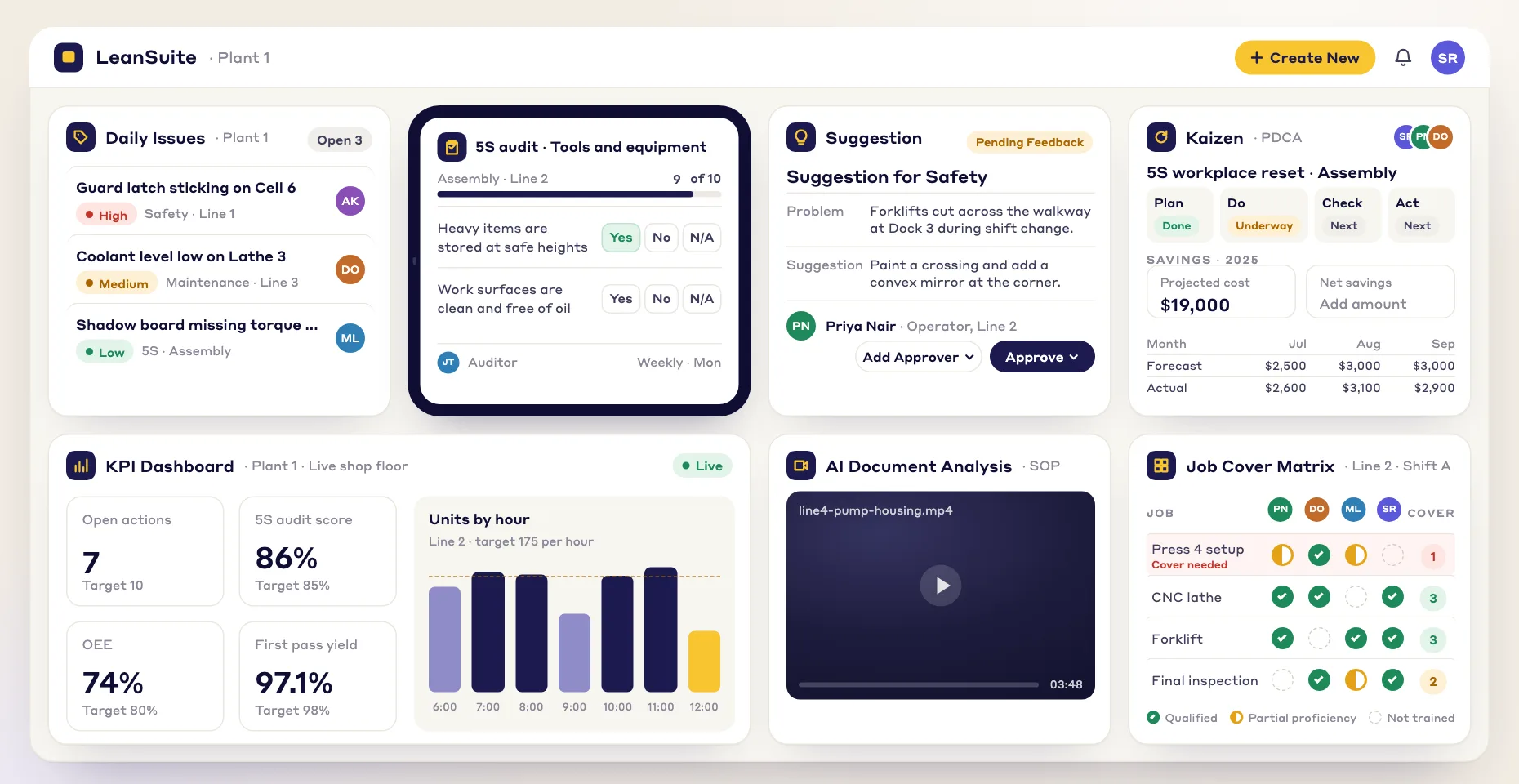
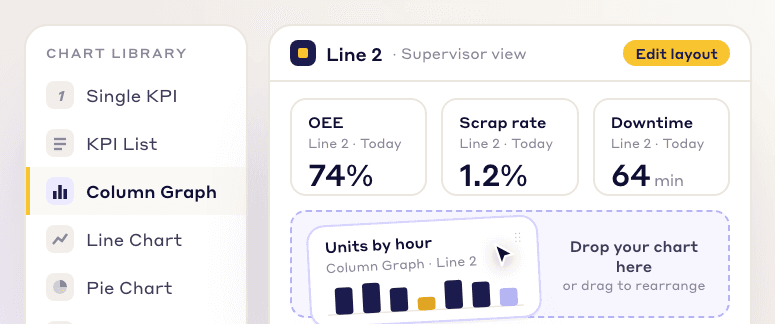
Customizable dashboards
Pick charts and KPIs from a library and arrange them into a view for each role, from the CEO to the frontline operator.
LeanSuite's KPI dashboards for manufacturing track every KPI against its target, with RAG ranges, KPI trees and live huddle boards, so operators and the plant manager act on the same numbers.
By clicking "Schedule Demo," you agree to the use of your data in accordance with LeanSuite's Privacy Notice, including for marketing purposes.
Buyer's guide
A manufacturing KPI dashboard shows a plant's key numbers (safety, quality, delivery, cost and people) against targets, so the people who can fix a problem see it while there is still time to act. A good one is built around the meetings that use it: a few KPIs per line reviewed every shift, rolled up for the area each day and the plant each week, with every red number tied to an owner and an action.
This guide is for the plant manager, CI lead or operations manager choosing manufacturing dashboard software. It covers the jobs a dashboard has to do, which KPIs to start with and their formulas, eleven questions for every vendor, when Excel is enough, a rollout plan, cost drivers and where LeanSuite fits. Want the spreadsheet version first? Download the free manufacturing KPI dashboard template.
Updated by the LeanSuite team
In short
What it has to do
Line lead, tier 1 huddle
See in ten minutes whether the shift is on plan and what stopped it.
Hour-by-hour output against plan, the top downtime reasons and open actions, on the board at the line.
Area or production manager, tier 2
Find which lines are red today and whether yesterday's actions closed.
Lines side by side against target, with actions that carried over and who owns them.
Plant manager, tier 3
Spot trends early and decide where to go and look.
Plant KPIs built from the lines' numbers, with trends against target and the losses ranked.
CI or quality engineer
Pick the next improvement project from data, not opinion.
Reason codes behind each loss, ranked in a Pareto, over weeks rather than one bad day.
Operations director
Compare plants on the same definitions.
One definition per KPI across sites, rolled up automatically.
VISUALIZE WHAT MATTERS
Build the views you need from live data, and give each person the dashboard that fits their job.
Pick charts and KPIs from a library and arrange them into a view for each role, from the CEO to the frontline operator.
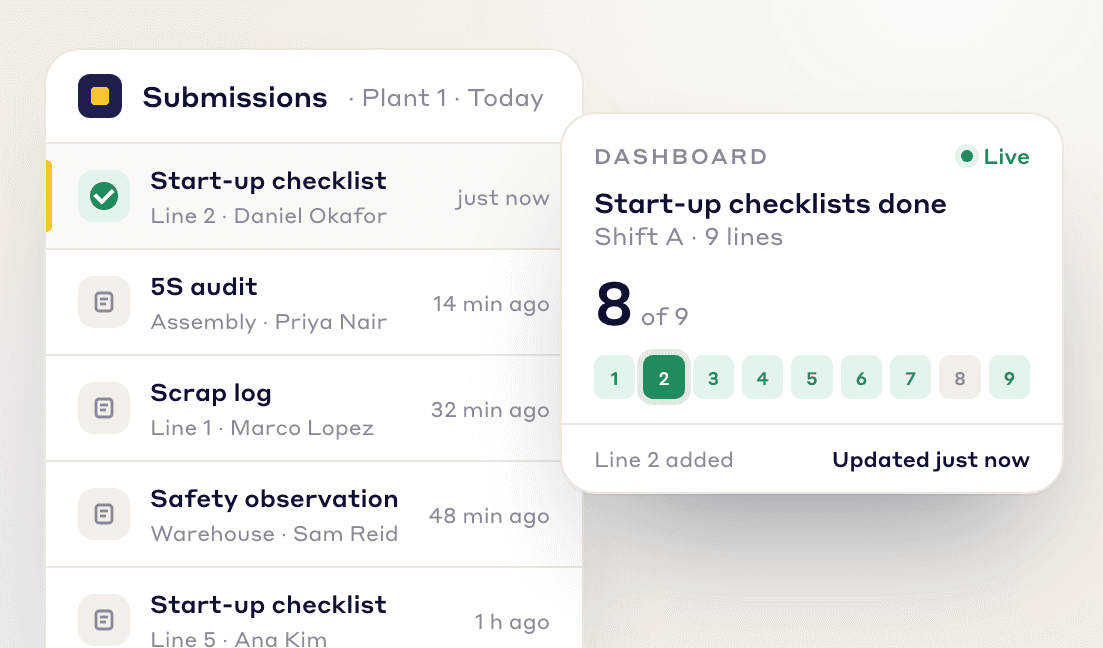
Every form, checklist and audit your team submits shows up on your dashboards right away, so nobody waits for the end-of-shift report.
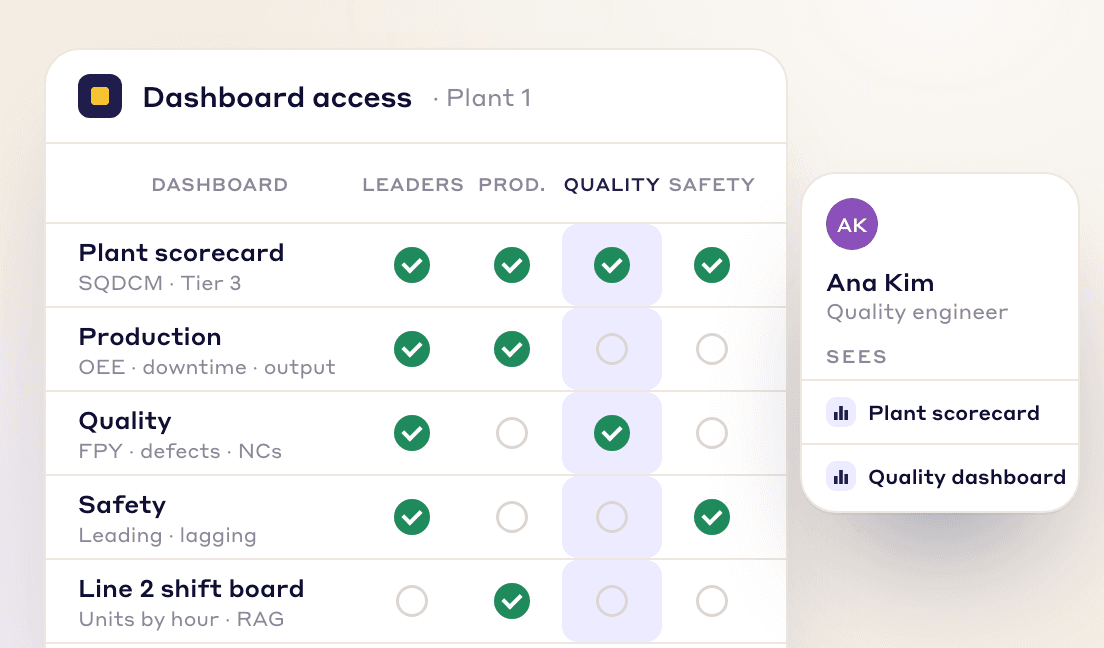
Assign dashboards to teams, departments or leadership levels, so each person sees the numbers that matter to their job.
Example KPI board
A manufacturing KPI dashboard shows a few key numbers for a plant or area against targets, colored green, amber or red so the team knows where to act this week. Each KPI needs one written formula, a direction (higher or lower is better), a target and an amber band. Five KPIs from one week of an illustrative plant with six assembly lines:
| KPI | Formula | This week | Example target | Amber band | Status |
|---|---|---|---|---|---|
| OEE | Availability × performance × first pass yield | 68.0% (86.0% × 84.0% × 94.1%) | 70% | 5 points | Amber |
| First pass yield | Good first time ÷ units made | 94.1% (32,645 of 34,692) | 95% | 2 points | Amber |
| Rework rate | Reworked ÷ units made | 4.3% (1,492 of 34,692) | 3.0% or lower | 1 point | Red |
| On-time delivery | Order lines on time ÷ order lines due | 95.1% (408 of 429) | 95% | 3 points | Green |
| Recordable incident rate | Recordable cases × 200,000 ÷ hours worked, 13 weeks to date | 3.85 (1 case in 51,980 hours) | 3.0 or lower | 1.0 | Amber |
Illustrative numbers from week 13 of the worked example in the free manufacturing KPI dashboard template. Targets and amber bands are example values, not benchmarks. The recordable rate uses the US Bureau of Labor Statistics incidence rate formula; which cases are recordable comes from your OSHA 300 log.
Read the red first: rework is the only KPI past its amber band, so it gets an owner and a date. The colors say where to look, not why. All 14 KPIs, 13 weeks of trend and every formula are in the free manufacturing KPI dashboard template. In LeanSuite you set the same targets and RAG ranges once, and a KPI is flagged as soon as new data crosses a limit.
Which KPIs
| KPI | Formula | Reviewed at |
|---|---|---|
| Near misses reportedSafety | Count of near-miss reports in the period; early on, more reports is a good sign | Tier 1 daily |
| Total recordable incident rateSafety | Recordable cases × 200,000 ÷ hours worked | Tier 3 monthly |
| First pass yieldQuality | Units good the first time ÷ units started (calculator) | Tier 1 each shift |
| Scrap rateQuality | Units scrapped ÷ total units made (calculator) | Tier 1 and 2 |
| Schedule attainmentDelivery | Actual output ÷ planned output for the shift or day | Tier 1 each shift |
| On-time deliveryDelivery | Order lines delivered on or before the promise date ÷ order lines due | Tier 3 weekly |
| OEECost | Availability × performance × quality (calculator) | Tier 1 and 2 |
| Unplanned downtimeCost | Minutes stopped, by reason, against planned time (cost it) | Tier 1 each shift |
| AbsenteeismPeople | Hours absent ÷ hours scheduled | Tier 2 daily |
| Qualified coverPeople | Qualified people per critical job per shift, against the number needed | Tier 2 weekly |
Worked example: a KPI definition card for first pass yield
Write a card like this for every KPI before you build anything. Most dashboard arguments are definition arguments: whether reworked units count as good, whether planned maintenance counts as downtime, whether a late order line counts once or per day late.
In the example, 96.2% sits in amber, so the shift records why the 38 units failed first time and the owner opens an action at the next huddle. Free tools that do the arithmetic: OEE calculator, TEEP calculator, MTBF and MTTR calculator. To record each stop against one agreed list of reasons, start from the downtime reason codes template. For maintenance numbers, see maintenance KPIs to track.
INTELLIGENT ANALYSIS
LeanSuite connects your data sources, calculates the KPIs you define and flags problems as the numbers come in.
Pull data from LeanSuite forms, ERP systems, MES or Excel files into one view. Values can also come in on a schedule from Excel on SharePoint or OneDrive or from Google Sheets, or from a CSV upload with one-time column mapping.
Combine data points, such as 'Cost' / 'Units Produced', into the metric you need with the formula engine.
Set Red-Amber-Green ranges and whether up or down is good. A KPI is flagged as soon as new data crosses a limit, so you can start an action plan right away.
FOR EVERY ROLE
Each role gets the KPIs it needs, from the shop floor to the top floor.
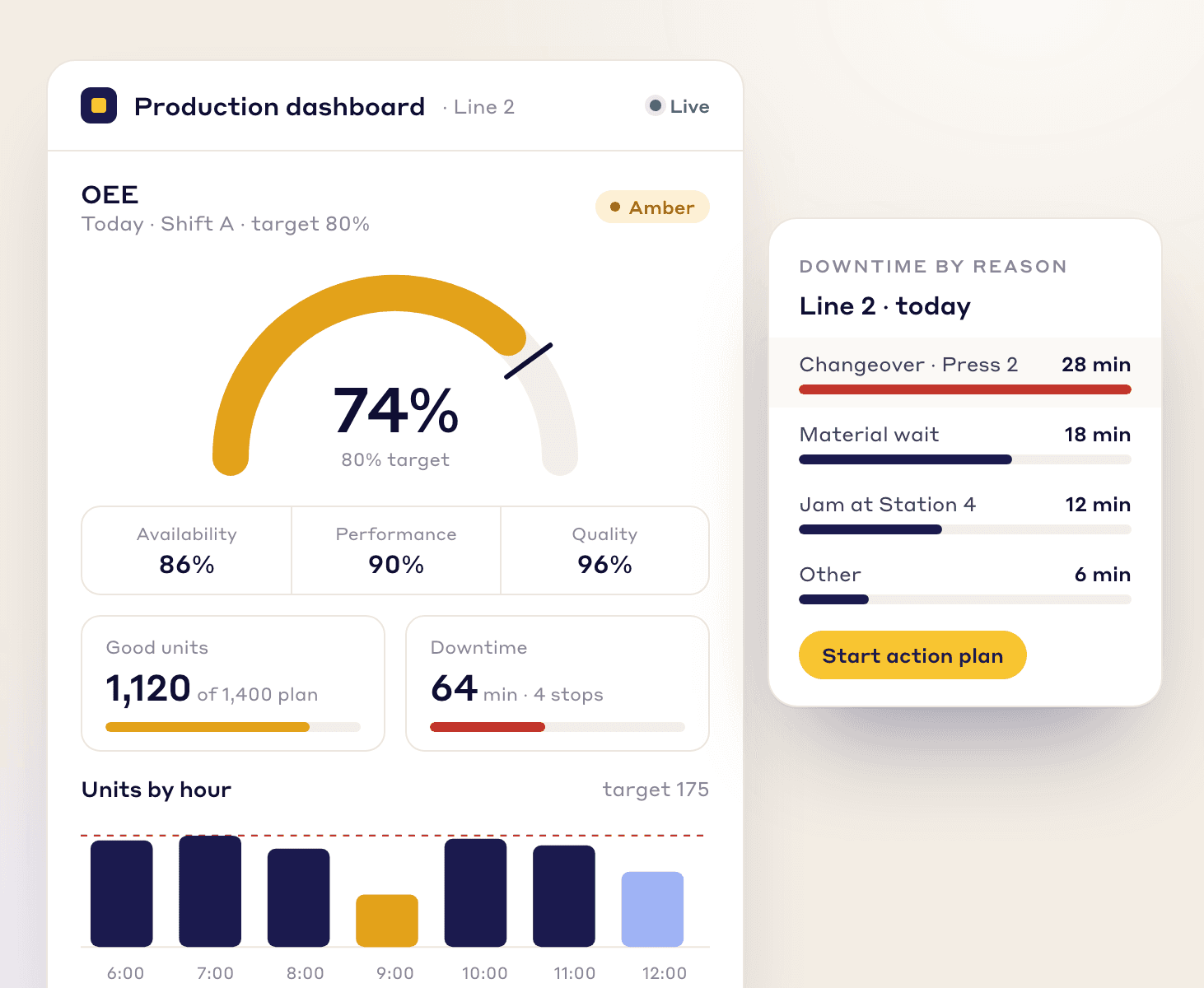
production dashboard
Track OEE, downtime and production counts live, so you can clear bottlenecks early and keep production on schedule.
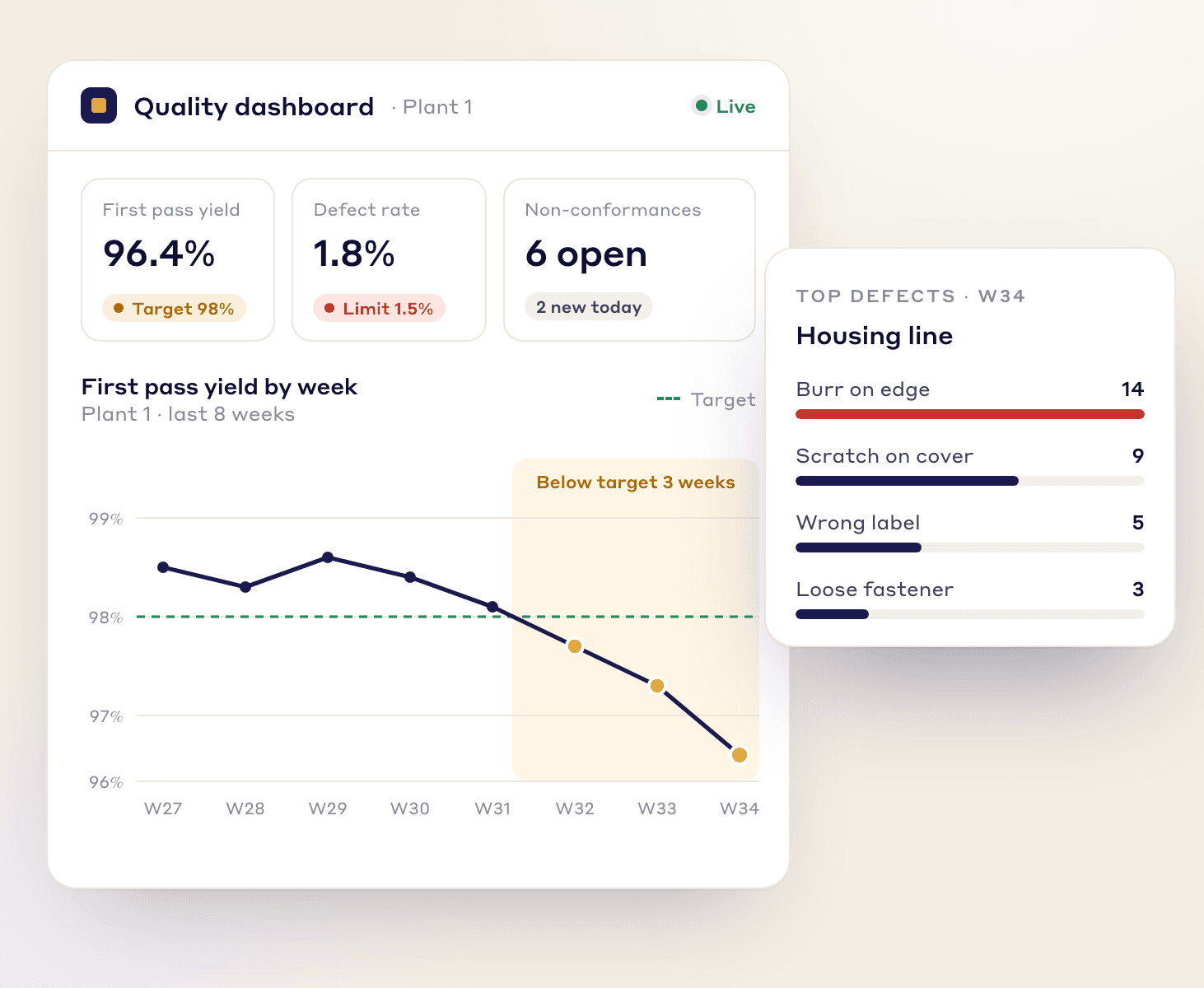
quality dashboard
Watch first pass yield, defect rates and non-conformances as they happen, so you catch trends before they reach customers.
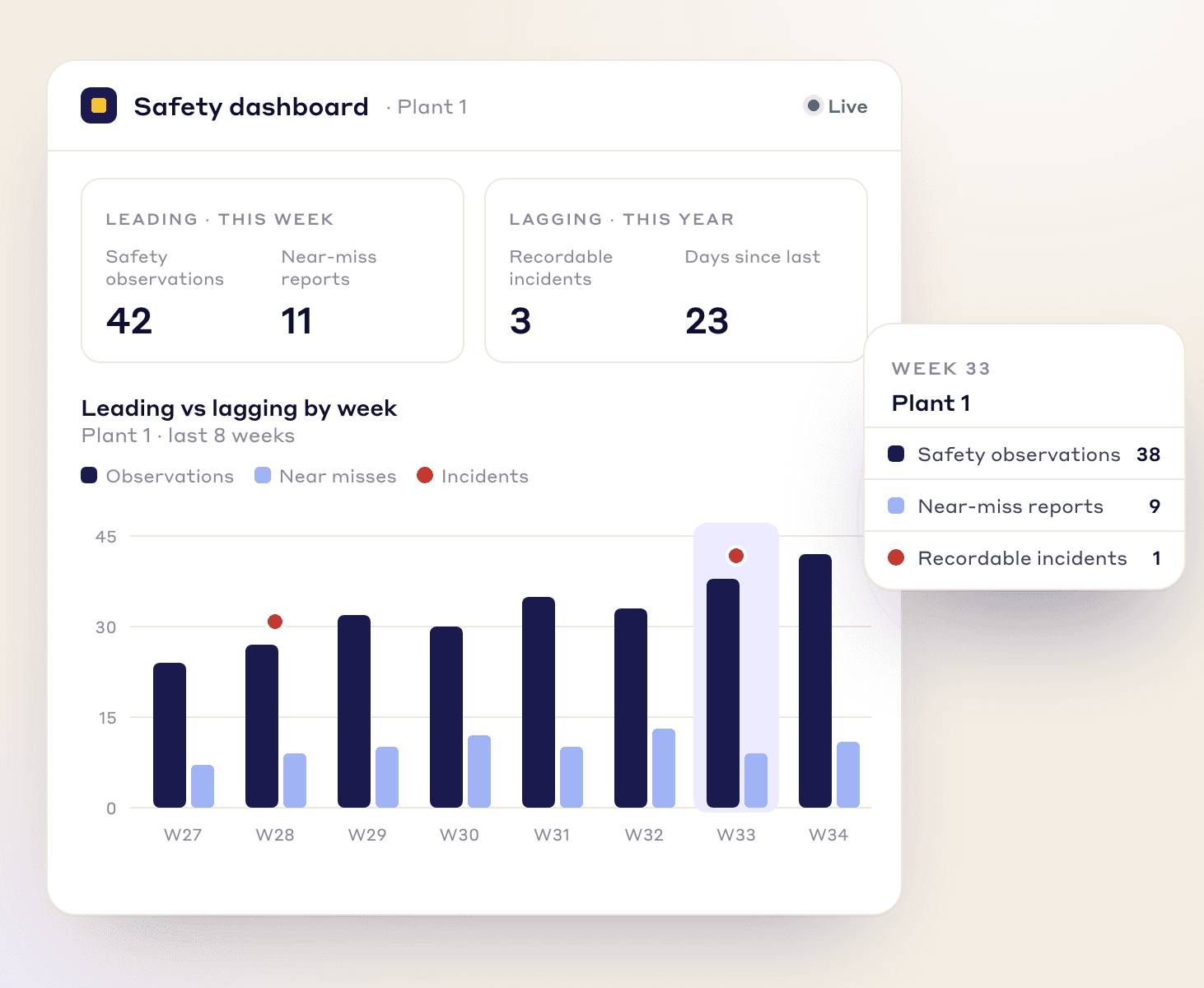
safety dashboard
Track leading indicators like safety observations and near-miss reports next to lagging ones like incident rates, and act on risk early.
KPI BUILDER
Set up each KPI once: its target, ranges, data source, who sees it and how it rolls up.
Set one target for the KPI or a different one per entry, RAG ranges, and whether up or down is good.
Department KPIs roll up to the plant and the company automatically, by sum or average.
Record the reasons behind each result and see them ranked in a Pareto chart.
Pull values on a schedule from Excel on SharePoint or OneDrive or from Google Sheets, or upload a CSV and map its columns once.
Type a single value, fill in several dates at once in a grid, or enter values from a Lean Studio board during a huddle.
Put KPIs on grid or freeform boards for huddles, and embed Power BI or Looker Studio reports on the same board. Lean Studio has 30 ready-made lean board templates and 15 data widgets.
ANY USE CASE
LeanSuite’s KPI Builder can create dashboards for use cases such as:
Operational Overview
Safety and Compliance
Supply Chain Optimization
Daily Production Monitoring
Inventory Management
Strategic Planning
Quality Control
Workforce Productivity
Predictive Maintenance
Cost Management
Equipment Performance
Training and Development
How to choose
Two plants calculating OEE differently will argue about the number instead of the problem. A definition is the formula, the unit, the target, which direction is good and who owns it.
Ask the vendor: Where is each KPI's formula, target and direction stored, and can the target differ by line or by date?
LeanSuite: Each KPI is set up once with its target (one for the KPI or a different one per entry), Red-Amber-Green ranges and whether up or down is good. The formula engine combines data points, such as Cost divided by Units Produced.
Much of what a line huddle needs (scrap reasons, safety observations, checklist results) is not in any system. If typing it in is slow, it gets entered at the end of the week, too late to act on.
Ask the vendor: How does an operator or lead enter a value at the line, and how long does it take? Do form and checklist results feed KPIs without re-typing?
LeanSuite: Every form, checklist and audit your team submits shows up on dashboards right away. Values can also be typed one at a time, entered for several dates in a grid, or entered from a Lean Studio board during the huddle.
Output may sit in the ERP, downtime in an MES and the scrap log in Excel. A dashboard that needs everything re-keyed will be abandoned; one that needs a custom integration for every source will be late.
Ask the vendor: Which sources connect without custom work, how often do they refresh, who maintains each connection, and what does it cost to add one?
LeanSuite: Data comes from LeanSuite forms and Excel files. Values can be pulled on a schedule from Excel on SharePoint or OneDrive or from Google Sheets, or uploaded as a CSV with one-time column mapping. For an ERP, an MES or any other system, we confirm how it connects on a call.
A line lead acts within the shift, so their numbers need to be current within the hour. A plant review acts on trends, so daily is fine. Paying for second-by-second data nobody acts on is waste.
Ask the vendor: For each data source, how fresh is the number on screen, and can I see when it was last updated?
LeanSuite: Form and checklist submissions appear on dashboards right away; Excel, Google Sheets and CSV values come in on the schedule you set or when uploaded.
A dashboard that turns red and stays red teaches people to ignore it. The test of a KPI system is what happens in the five minutes after a limit is crossed.
Ask the vendor: When a KPI goes red, what happens? Can I open an action from it, with an owner and a due date, and see it at the next huddle?
LeanSuite: A KPI is flagged as soon as new data crosses a limit, and the team starts an action plan from it. See tiered meetings for how actions carry from huddle to huddle.
The plant manager's OEE should be built from the lines' numbers, not typed separately. Ratios need care: averaging two lines' OEE is wrong when their planned time differs.
Ask the vendor: How does a line KPI roll up to the area and plant, and how are ratio KPIs such as OEE or first pass yield combined?
LeanSuite: Department KPIs roll up to the plant and the company automatically, by sum or average. Ask us to show how a ratio such as OEE rolls up in your setup.
Knowing OEE fell is the start; knowing that 60 of the 90 lost minutes were changeovers is what picks the next improvement.
Ask the vendor: Can each result carry reason codes, and can I see them ranked in a Pareto chart?
LeanSuite: You record the reasons behind each result and see them ranked in a Pareto chart.
Tier meetings happen standing at a board or a TV, not at a desk. The dashboard has to read from two metres away and work on a touchscreen or tablet.
Ask the vendor: Show me the board a shift lead would run the huddle from, on a TV and on a tablet.
LeanSuite: KPIs go on grid or freeform Lean Studio boards for huddles. Lean Studio has 30 ready-made lean board templates and 15 data widgets.
An operator needs the hour-by-hour count for the line; a quality engineer needs defects by part; an executive needs plants side by side. One screen for everyone serves no one.
Ask the vendor: Can I give dashboards to teams, departments or leadership levels, and restrict who sees what?
LeanSuite: Dashboards are assigned to teams, departments or leadership levels, from the frontline operator to the CEO.
Many plants already have Power BI or Looker Studio for analysis. The floor tool should not force a choice; it should handle targets, huddles and actions and sit next to the reports.
Ask the vendor: Can I show our existing Power BI or Looker Studio reports next to your KPIs?
LeanSuite: Existing Power BI or Looker Studio reports can be embedded on a Lean Studio board next to your LeanSuite KPIs.
Per-viewer licences push plants to show dashboards to managers only. The people who can change the number are on the floor.
Ask the vendor: What does it cost for every operator, lead and manager to see their dashboard?
LeanSuite: One flat price per facility with unlimited users. See pricing.
Comparing tools side by side? Our guide to the best manufacturing KPI dashboard software uses only what each vendor publishes, and the one on tiered meeting software covers the huddle side.
Excel or software?
| Your situation | Excel is enough | Software earns its keep |
|---|---|---|
| Review rhythm | Managers review a handful of KPIs once a week. | Lines review KPIs every shift and areas every day. |
| Who enters data | One person compiles the numbers from reports. | Many people on several shifts enter or submit data. |
| Acting on red | Actions are agreed in the meeting and tracked on a whiteboard. | Each red number needs an owner and a due date that follow it to the next meeting. |
| Existing BI | Your BI team already models the data and the plant only needs reports. | Reports exist, but huddles still run on paper and nobody tracks the actions. |
| Sites | One site with its own definitions. | Several sites that must compare the same KPI the same way. |
| History and trend | A 13-week trend in a spreadsheet is enough. | You need trends, Pareto reasons and roll-ups without rebuilding the file each week. |
Mostly the middle column? The free manufacturing KPI dashboard template turns one row of weekly plant numbers into 14 KPIs against targets, and the hour-by-hour production board covers the line huddle on paper. Mostly the right column? See LeanSuite vs spreadsheets and LeanSuite vs Power Apps.
Rollout plan
Step 1 · Week 0
Pick five to eight KPIs a line can influence in a shift, covering safety, quality, delivery, cost and people. Write a definition card for each: formula, unit, target, ranges, owner, source and the meeting where it is reviewed.
Step 2 · Week 1
For each KPI decide where the number comes from: a system, a spreadsheet or a form filled at the line. Where no source exists, start with manual entry rather than waiting for an integration.
Step 3 · Weeks 2 to 4
Build the board for one line and run every shift's huddle on it for two to three weeks. Expect to change definitions and targets; that is the point of the pilot.
Step 4 · Weeks 3 to 6
Each red KPI gets an owner and a due date in the huddle, and open actions are the first item at the next one. Track how many actions close on time.
Step 5 · Weeks 6 to 9
Add the tier 2 and tier 3 views from the same KPIs, with trends and Pareto reasons. Check that ratio KPIs roll up from their inputs, not as averages of percentages.
Step 6 · Weeks 9 to 12
Reuse the definitions on the next lines. Review targets every quarter, and retire any KPI nobody has acted on for a month.
What makes it take longer
With LeanSuite, our team handles setup and the first module is live in under a week. The 90-day pilot covers one facility, and at day 90 you decide whether to continue. Our article on tier boards for daily management covers the meeting side.
Cost
Per viewer, per editor or per site. Count everyone who should see a dashboard, including operators at the line.
Connecting ERP, MES and spreadsheets, and maintaining those connections when systems or files change.
TVs or touchscreens at the boards, tablets for leads, and network coverage at the line.
Agreeing formulas and reason codes, and someone owning them so plants keep calculating the same way.
Time to build boards per tier and role. Templates cut it; custom BI development adds to it.
Huddles already take time. A board that is ready when the meeting starts saves the preparation.
How LeanSuite is priced
One flat price per facility with unlimited users; request a quote on the pricing page.
The 90-day pilot costs $3,000 per facility, and our team does the setup.
A small business plan is $499 a month for one facility with up to 25 employees (apply here).
Pitfalls
If no standing meeting reviews it, the dashboard is looked at when something has already gone wrong.
Instead: Name the meeting, the time and the owner for every view before you build it.
Twenty numbers on a line board means nobody knows which one to act on.
Instead: Keep five to eight per tier; move the rest to a drill-down.
76% OEE means nothing on its own: is it good, getting better or falling?
Instead: Show every KPI against its target and next to its recent trend.
A line running 2 hours at 50% and one running 22 hours at 85% do not average to 67.5%.
Instead: Roll up the inputs (minutes, units) and recalculate, or weight by planned time.
The KPI turns red, everyone sees it, nobody acts, and next week it is still red.
Instead: Every red gets an owner and a due date in the huddle; open actions are reviewed first next time.
Plant A excludes planned maintenance from OEE, plant B does not, and the comparison is meaningless.
Instead: Keep one definition card per KPI for the company and change it in one place.
See it on your problem
Target, RAG ranges and direction, a calculated KPI from the formula engine, and where its data comes from.
A checklist submission updating a dashboard, values entered during a huddle, and a scheduled pull from Excel or Google Sheets.
A Lean Studio board for a line huddle, a red KPI, and an action plan started from it.
A KPI tree from department to plant, Pareto reasons, role-based dashboards and an embedded Power BI or Looker Studio report.
FAQs
A manufacturing KPI dashboard shows key performance numbers, such as OEE, downtime or defect rates, on one screen so teams can act on them during the shift. LeanSuite builds these dashboards from live shop floor data, with a view for each role from the operator to the plant manager.
Start with five to eight that the line can influence in a shift, across safety, quality, delivery, cost and people: for example near misses reported, first pass yield, scrap rate, schedule attainment, OEE and unplanned downtime by reason. Add on-time delivery, recordable incident rate and absenteeism at the plant level.
An ERP dashboard reports what the ERP holds, such as orders, inventory and cost, usually for managers and usually after the fact. A shop floor KPI dashboard combines ERP numbers with data captured at the line (downtime reasons, scrap, safety checks) and is built around shift huddles, targets and actions.
The best fit depends on your data and your meetings. Check that it holds KPI definitions and targets, takes floor data quickly, connects to your ERP or spreadsheets, turns red numbers into owned actions, rolls up from line to plant and runs on a huddle board. Our comparison of manufacturing KPI dashboard software sets the main tools side by side.
Pick a few KPIs per meeting tier, write a definition for each (formula, target, ranges, owner, source), map each to its data, run one line's huddle on it for a few weeks, tie every red number to an action, then roll up to the area and plant and copy to other lines.
Excel works when a few managers review a handful of KPIs weekly and one person compiles the data. Software pays off when lines review KPIs every shift, many people enter data, red numbers need owned actions, or several sites must compare the same KPI the same way. Our free Excel KPI dashboard template is a good start.
Match the refresh to the decision. Line KPIs used in the shift huddle should be current within the hour, area KPIs daily, plant and company KPIs daily or weekly. Faster refresh than anyone acts on adds cost without benefit.
Overall equipment effectiveness (OEE) measures how much of a machine's planned production time is truly productive: availability × performance × quality. LeanSuite's production dashboard tracks OEE and its three factors next to downtime by reason and output against plan.
Yes. KPI dashboards take data from LeanSuite forms and Excel files, so the numbers sit in one view. Values can also be pulled on a schedule from Excel on SharePoint or OneDrive or from Google Sheets, uploaded as a CSV with one-time column mapping, or typed in. For an ERP, an MES or any other system, we confirm how it connects on a call.
Yes. The formula engine combines data points, such as Cost divided by Units Produced, into the metric you need, and you arrange charts into a view for each role.
A KPI tree links a top-level KPI to the KPIs that drive it. In LeanSuite, department KPIs roll up to the plant and the company automatically, by sum or average.
You set Red-Amber-Green ranges for any KPI and say whether up or down is good. LeanSuite flags it as soon as new data crosses a limit, so you can start an action plan right away.
Power BI shows data someone has prepared. A LeanSuite KPI sits next to the work: when it crosses its limit it is flagged, the team starts an action plan from it, and the same KPI shows on the huddle board. Your existing Power BI or Looker Studio reports can be embedded on a Lean Studio board next to your LeanSuite KPIs.
Production managers track OEE, downtime and output, quality engineers watch first pass yield and defects, and safety supervisors track observations and near misses next to incident rates. You assign dashboards to teams, departments or leadership levels.
FREE RESOURCES
Not ready for software yet? Start with these free resources.
Bring a few of your KPIs and where the data lives, and we'll show how LeanSuite tracks, flags and rolls them up, and what a 90-day pilot covers.